MCP Integration
Use Tagstack directly inside Claude, ChatGPT, and any MCP-compatible AI agent.
The Model Context Protocol (MCP) lets AI assistants call external tools on your behalf. With Tagstack connected as an MCP server, your AI agent can scan any website, detect its marketing technology stack, and surface martech insights — without leaving the chat. Think of it as giving your AI a built-in GTM inspector.
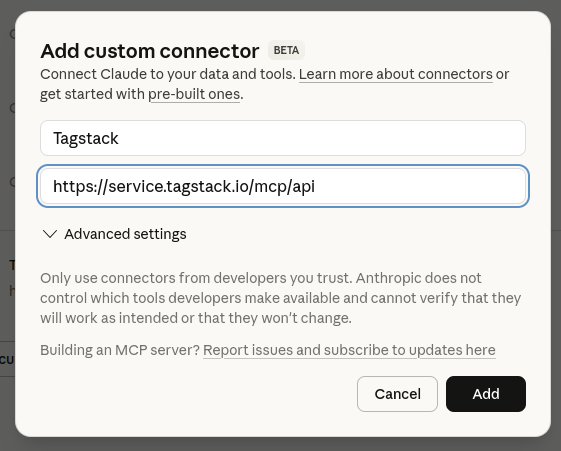
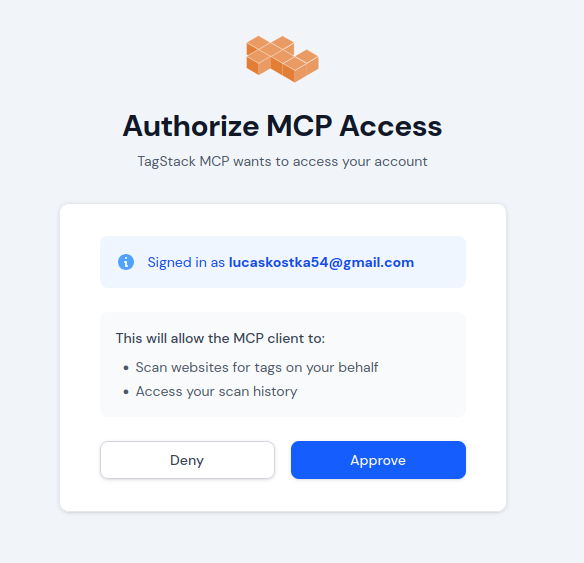
Free plan works. MCP access is available on all Tagstack plans including free. Scans made through the MCP tool count against your normal monthly scan allowance.
Available Tools
The tools are designed around a two-step gate pattern: cheap summary tools first, expensive detail tools only when the user explicitly asks. This keeps token costs predictable and prevents Claude from accidentally dumping 100k tokens of container JSON into your context.
| Tool | Cost | Use when… |
|---|---|---|
| get_technologies | cheap | You want a vendor list + container overview. Always call this first. |
| has_server_side | cheap | The only question is whether GA4 server-side tagging is active. |
| get_tags | medium | You need the full tag list with names and types, not just vendor counts. |
| get_full_audit | expensive | You need the raw container JSON. Always gated — Claude asks you to confirm first. |
The summary gate. Returns the vendor list, per-container metadata (tag count, consent mode, CMP, server-side flag), and a fullAuditTokenEstimate so Claude can warn you before calling the expensive tools. Call this first for any new site.
| Parameter | Description | |
|---|---|---|
url string | Website URL or GTM container ID (e.g. GTM-XXXX). | Required |
Checks whether GA4 server-side tagging is configured (a server-side GTM transport URL detected on the GA4 tag). Returns a top-level boolean plus a per-container breakdown. Ultra-focused — use this instead of get_technologies when that's the only thing you need to know.
| Parameter | Description | |
|---|---|---|
url string | Website URL or GTM container ID. | Required |
Returns the full tag list per container — name, type, and paused status for every tag. More granular than get_technologies, but far cheaper than get_full_audit. Useful for "show me every tag firing on this site" or spotting paused/duplicate tags.
| Parameter | Description | |
|---|---|---|
url string | Website URL or GTM container ID. | Required |
Returns the complete container data — all tags with their parameters, consent configuration, CMP detection, and server-side status. Can be very large for complex containers (50k–150k tokens). Built-in two-step gate: the first call always returns a cost estimate; the full data is only returned after you pass confirmed: true.
| Parameter | Description | |
|---|---|---|
url string | Website URL or GTM container ID. | Required |
confirmed boolean | Set to true after the user has confirmed the cost. Without this, only a token estimate is returned. | Optional |
Example Prompts
Once connected, just ask Claude in plain English. Here are prompts you can copy and use right away:
Compatibility
Tagstack uses the Streamable HTTP transport (MCP 2025-03-26 spec) — the modern standard that works with most MCP clients without needing a local proxy or SSE connection.
| Client | Status | Notes |
|---|---|---|
| Claude.ai | Supported | Use the Quick Connect steps above. Requires Claude Pro or Team plan. |
| Claude Desktop | Supported | Add to claude_desktop_config.json — see snippet below. |
| Other MCP clients | Should work | Any client that supports Streamable HTTP + OAuth 2.1 dynamic client registration. |
Add this to your claude_desktop_config.json file (located at ~/Library/Application Support/Claude/ on macOS):
OAuth login required. When Claude Desktop first calls a Tagstack tool, it will open a browser window to authenticate with tagstack.io. This only happens once — the token is stored locally and reused for future calls.
Troubleshooting
Most connection issues have a simple fix. Check these first:
GTM-XXXX) if you know it. Alternatively, use the web scanner to check what's detected for that domain.Still stuck? Reach out at lucas@tagstack.io — happy to help debug your setup.